
Samsung TV Bluetooth Repair in Nairobi – Bluetooth Not Working, Remote Pairing, Soundbar and Wireless Device Connection Problems
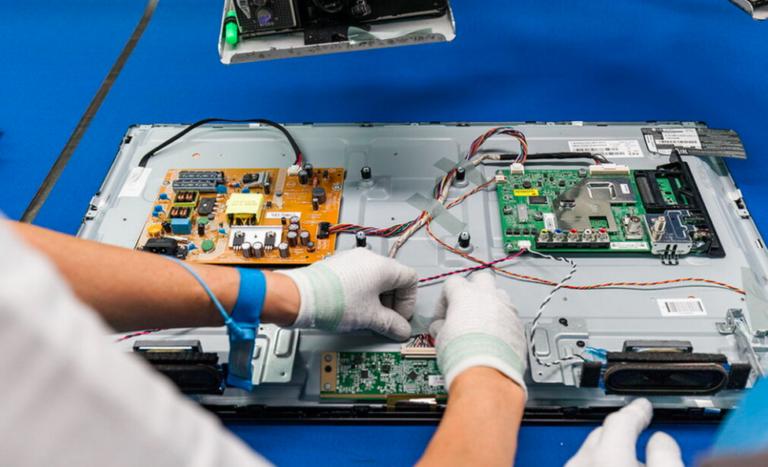
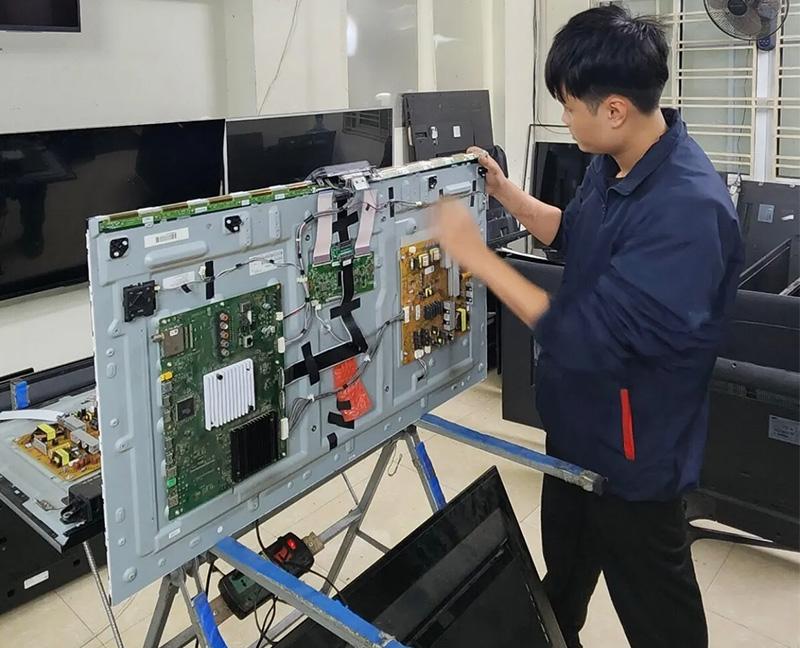
Samsung Smart TVs use Bluetooth technology to connect to compatible wireless devices such as headphones, soundbars, speakers, keyboards, game controllers, and certain remote controls. When Bluetooth stops working, users may experience pairing problems, devices failing to appear, Bluetooth connections dropping, audio delays, or wireless accessories refusing to connect.
At GossTech Kenya Technologies, we provide Samsung TV Bluetooth troubleshooting, Smart TV repair, wireless connectivity diagnosis, motherboard repair, and Bluetooth-related hardware repair services in Nairobi and Across Kenya.
Whether your Samsung TV cannot detect Bluetooth devices, refuses to pair with headphones, has problems connecting to a soundbar, or keeps disconnecting from wireless accessories, our technicians can diagnose the problem and recommend the appropriate repair.
Samsung TV Bluetooth Repair Services in Nairobi
Samsung television Bluetooth problems can originate from software settings, wireless interference, faulty accessories, internal Bluetooth components, Wi-Fi/Bluetooth modules, or motherboard circuitry.
Our Samsung TV repair services cover common Bluetooth problems, including:
Samsung TV Bluetooth not working
Samsung TV Bluetooth not detecting devices
Bluetooth headphones not connecting
Samsung TV Bluetooth soundbar pairing problems
Bluetooth speaker connection failure
Samsung TV remote not pairing
Bluetooth connection keeps disconnecting
Bluetooth devices disappearing from the TV
Samsung TV unable to connect to wireless accessories
Bluetooth audio delays
Bluetooth connection problems after software updates
Bluetooth module faults
Samsung TV motherboard-related Bluetooth problems
We diagnose the actual cause of the fault before recommending repairs or replacement components.
Samsung TV Bluetooth Not Working
One of the most common Samsung Smart TV problems is Bluetooth connectivity failure.
You may open the Bluetooth settings, search for devices, and find that your television cannot detect any nearby Bluetooth accessories.
Alternatively, Bluetooth may appear to be available, but the television may fail to establish a connection.
Common symptoms
Bluetooth option missing from settings.
TV cannot detect Bluetooth headphones.
Bluetooth speakers fail to connect.
Samsung TV cannot find nearby devices.
Bluetooth pairing repeatedly fails.
Connected devices disconnect unexpectedly.
Bluetooth works intermittently.
Bluetooth accessories stop working after a software update.
These symptoms may be caused by software problems, wireless module faults, internal antenna issues, or motherboard failure.
Samsung TV Bluetooth Not Detecting Devices
When your Samsung TV cannot detect nearby Bluetooth devices, the problem may involve the television, the accessory, or the wireless environment.
Possible causes
Bluetooth device is not in pairing mode.
Accessory is already connected to another device.
Bluetooth device battery is low.
Wireless interference.
Television software malfunction.
Bluetooth module failure.
Faulty internal antenna.
Mainboard communication problem.
Before diagnosing the television, confirm that the Bluetooth accessory is functioning correctly and is discoverable.
If your Samsung TV cannot detect multiple Bluetooth devices, including headphones, speakers, and other compatible accessories, the television may require professional diagnosis.
Samsung TV Bluetooth Headphones Not Connecting
Many Samsung TV owners connect wireless headphones to watch television without disturbing other people.
When Bluetooth headphones refuse to pair, the television may fail to detect them or may display a pairing message without completing the connection.
Common headphone connection problems
Samsung TV cannot find Bluetooth headphones.
Headphones appear but will not connect.
Pairing repeatedly fails.
Headphones connect but produce no sound.
Audio keeps disconnecting.
Bluetooth headphones work with a phone but not the TV.
TV audio continues playing through the television speakers.
Troubleshooting
Charge the Bluetooth headphones.
Disconnect them from other devices.
Put the headphones into pairing mode.
Restart the Samsung TV.
Open the Bluetooth device list.
Remove old paired devices if necessary.
Attempt pairing again.
If the headphones connect to other devices but your Samsung TV cannot detect or pair with multiple Bluetooth accessories, the TV may have a Bluetooth-related fault.
Samsung TV Bluetooth Soundbar Connection Problems
Samsung televisions can connect to compatible wireless soundbars using Bluetooth.
However, Bluetooth connection problems may prevent the soundbar from pairing or maintaining a stable connection.
Common problems
Samsung TV cannot detect the soundbar.
Soundbar appears in the Bluetooth list but will not connect.
Bluetooth soundbar disconnects randomly.
Audio cuts out.
Soundbar connects but produces no sound.
Television continues using its internal speakers.
Soundbar pairing stops working after a software update.
Possible causes include soundbar compatibility issues, incorrect settings, wireless interference, television software problems, or internal Bluetooth hardware faults.
If the soundbar works correctly with other devices but cannot connect to your Samsung TV, the television may require troubleshooting.
Samsung TV Bluetooth Remote Not Pairing
Some Samsung Smart TV remotes use Bluetooth technology to communicate with the television.
When the remote fails to pair, users may experience problems with voice commands, navigation, or certain smart remote functions.
Symptoms
Samsung Smart Remote not connecting.
Voice control not working.
Remote works only when pointed directly at the television.
Remote pairing message appears repeatedly.
Remote disconnects unexpectedly.
Some remote buttons work while other smart functions fail.
Not every remote control problem is caused by the TV’s Bluetooth system. Batteries, remote control damage, pairing procedures, and infrared functionality should also be checked.
Samsung Smart Remote pairing troubleshooting
Depending on the remote model, pairing may involve holding specific buttons simultaneously while pointing the remote toward the television.
The exact pairing procedure differs between Samsung remote models.
If a compatible remote cannot pair despite correct procedures and working batteries, the television’s Bluetooth system may need diagnosis.
Samsung TV Bluetooth Keeps Disconnecting
A Bluetooth device may successfully connect to the television but disconnect repeatedly.
This can interrupt audio playback and make wireless headphones or soundbars difficult to use.
Possible causes
Wireless interference
Weak Bluetooth signal
Accessory battery problems
Bluetooth device compatibility
Television software problems
Faulty wireless module
Internal antenna issues
Motherboard faults
If multiple Bluetooth accessories disconnect from the same Samsung TV, the problem may be related to the television rather than a single accessory.
Samsung TV Bluetooth Audio Delay
Bluetooth audio delay occurs when the sound arrives later than the picture.
This can be particularly noticeable when watching movies, television programmes, sports, or gaming.
Common causes
Bluetooth transmission latency
Headphone or soundbar limitations
Television audio processing settings
Device compatibility
Software issues
Wireless interference
Some audio delay can be adjusted through the television’s audio settings. However, persistent Bluetooth connectivity problems may require further diagnosis.
Samsung TV Bluetooth Option Missing
Sometimes the Bluetooth option may disappear from the television’s settings.
This can prevent users from searching for wireless devices or connecting Bluetooth accessories.
Possible causes include:
Software malfunction
Firmware corruption
Bluetooth module failure
Internal wireless component problems
Mainboard faults
If restarting the TV and performing basic software troubleshooting does not restore Bluetooth functionality, the television may require professional repair.
Samsung TV Bluetooth Problems After a Software Update
Bluetooth problems may begin after a Samsung television software update.
The television may previously have connected to headphones, speakers, or a remote control normally, but afterwards pairing may fail.
Possible symptoms include:
Bluetooth devices no longer appearing.
Previously paired devices failing to connect.
Bluetooth audio disconnecting.
Remote pairing problems.
Bluetooth settings becoming unavailable.
Software-related problems should be investigated before replacing hardware.
Samsung TV Bluetooth Module Repair
Bluetooth functionality in Samsung televisions may depend on wireless modules, antenna connections, integrated wireless components, and motherboard circuitry.
When these components develop faults, the television may fail to detect or connect to compatible devices.
Possible Bluetooth hardware faults
Defective Bluetooth module
Faulty wireless communication module
Damaged internal antenna
Loose internal antenna connection
Bluetooth circuitry failure
Mainboard fault
Electrical surge damage
Component failure
Depending on the Samsung TV model, Bluetooth and Wi-Fi may share components or be integrated into a common wireless module.
Therefore, a television experiencing both Wi-Fi and Bluetooth problems may require investigation of shared wireless hardware.
Samsung TV Motherboard Repair for Bluetooth Problems
Bluetooth problems may sometimes originate from the Samsung TV motherboard.
The mainboard controls communication between various television components, including wireless systems, software, and external devices.
A motherboard-related Bluetooth fault may cause:
Bluetooth not working
Wi-Fi and Bluetooth failure together
Remote pairing problems
Wireless accessories not detected
Smart TV freezing
Bluetooth connection instability
Multiple connectivity features failing
Depending on the fault, motherboard-level repair or replacement may be necessary.
Samsung TV Bluetooth Repair Process
At GossTech Kenya Technologies, we diagnose Bluetooth problems before recommending repairs.
Our diagnostic process generally involves:
Identifying the Samsung television model.
Establishing which Bluetooth functions are affected.
Testing the television with compatible Bluetooth accessories.
Checking Bluetooth settings and pairing functionality.
Investigating software-related problems.
Checking wireless hardware and antenna connections where necessary.
Diagnosing Bluetooth module or motherboard faults.
Recommending the appropriate repair.
Testing Bluetooth functionality after repair.
This approach helps avoid unnecessary replacement of components.
Samsung TV Bluetooth Troubleshooting Before Repair
Before contacting a technician, you can try the following checks.
1. Restart the television
Switch off your Samsung TV and disconnect it from the power socket for approximately one minute.
Reconnect it and try Bluetooth pairing again.
2. Check your Bluetooth accessory
Confirm that your headphones, speaker, soundbar, or other accessory is switched on and in pairing mode.
3. Disconnect the accessory from other devices
Some Bluetooth accessories automatically reconnect to previously paired phones or computers.
Disconnect them from other devices before pairing with the TV.
4. Move closer to the television
Keep the Bluetooth accessory close to the TV during pairing.
5. Remove old paired devices
If the television has stored many Bluetooth connections, remove unused devices where possible and try pairing again.
6. Restart the accessory
Switch the Bluetooth accessory off and on, or reset it according to its manufacturer’s instructions.
7. Check Samsung TV software
If your TV is experiencing software-related connectivity problems, check whether a compatible software update is available.
8. Test another Bluetooth device
Try pairing another Bluetooth accessory.
If the television cannot connect to multiple working Bluetooth devices, the problem may be within the television.
Samsung TV Bluetooth Repair for Different Samsung Models
GossTech Kenya Technologies provides Bluetooth troubleshooting and repair services for various Samsung television types, including:
Samsung LED TVs
Samsung LCD TVs
Samsung Smart TVs
Samsung Crystal UHD TVs
Samsung 4K TVs
Samsung QLED TVs
Samsung Neo QLED TVs
Samsung OLED TVs
Samsung Frame TVs
Samsung curved televisions
Bluetooth hardware, wireless modules, and motherboard designs may differ depending on the television model, screen size, and manufacturing year.
We diagnose the specific television before recommending repairs or replacement parts.
Samsung TV Bluetooth Repair Cost in Nairobi
The cost of Samsung TV Bluetooth repair depends on the nature of the fault.
A software-related problem may require less work than replacing a wireless module or repairing motherboard circuitry.
Factors affecting the repair cost include:
Samsung TV model
Screen size
Nature of the Bluetooth problem
Wireless module availability
Antenna condition
Motherboard damage
Availability of compatible replacement parts
Whether component-level repair is possible
At GossTech Kenya Technologies, we diagnose the problem before recommending the appropriate repair.
Samsung TV Bluetooth Repair or Replacement?
Not every Bluetooth problem requires replacing the entire motherboard.
Depending on the diagnosis, possible solutions include:
Software troubleshooting
Bluetooth pairing configuration
Firmware troubleshooting
Internal antenna repair
Wireless module replacement
Motherboard circuit repair
Mainboard replacement where necessary
The appropriate solution depends on the television model and the actual fault.
Samsung TV Bluetooth Repair in Nairobi and Across Kenya
GossTech Kenya Technologies provides Samsung Smart TV repair services in Nairobi and surrounding areas, including:
Westlands
Parklands
Kilimani
Kileleshwa
Lavington
Karen
Langata
Runda
Muthaiga
Ridgeways
Kiambu Road
Kasarani
Roysambu
Embakasi
Donholm
South B
South C
Ruaka
Kiambu
Ruiru
Thika
Athi River
Kitengela
We also serve customers in other towns and counties across Kenya.
Whether your Samsung TV Bluetooth is not working, cannot detect headphones, fails to connect to a soundbar, or has remote pairing problems, we can help diagnose the fault.
Why Choose GossTech Kenya Technologies?
When your Samsung television develops Bluetooth connectivity problems, professional diagnosis can help identify the actual cause.
At GossTech Kenya Technologies, we provide:
Samsung Smart TV repair
Bluetooth troubleshooting
Wireless connectivity diagnosis
Bluetooth module repair and replacement where applicable
Samsung motherboard repair
Smart Remote pairing troubleshooting
Bluetooth headphone connection troubleshooting
Soundbar connectivity diagnosis
Repair of different Samsung television models
Television repair services in Nairobi and Across Kenya
Our technicians diagnose both software-related and hardware-related television problems.
Frequently Asked Questions About Samsung TV Bluetooth Repair
Why is my Samsung TV Bluetooth not working?
The problem may be caused by software issues, Bluetooth settings, wireless interference, a faulty Bluetooth module, antenna problems, or motherboard failure.
Why is my Samsung TV not detecting Bluetooth headphones?
Your headphones may not be in pairing mode, may already be connected to another device, or the TV may have a Bluetooth connectivity fault.
Can Samsung TV Bluetooth be repaired?
Yes. Many Bluetooth problems can be repaired through software troubleshooting, wireless module repair or replacement, antenna repair, or motherboard-level repair.
Why won’t my Samsung TV connect to my Bluetooth soundbar?
The problem may involve pairing settings, compatibility, wireless interference, soundbar faults, television software, or Bluetooth hardware.
Can a Samsung TV remote use Bluetooth?
Yes. Certain Samsung Smart Remotes use Bluetooth communication for functions such as voice commands and smart control features.
Why does my Samsung TV Bluetooth keep disconnecting?
Repeated disconnections may be caused by interference, weak signal, accessory problems, software issues, a faulty wireless module, or internal hardware faults.
Can Wi-Fi and Bluetooth fail at the same time?
Yes. Depending on the Samsung TV model, Wi-Fi and Bluetooth may share wireless components or be integrated into a common wireless module. A fault affecting shared hardware can cause both functions to fail.
Can Bluetooth problems be repaired without replacing the motherboard?
Yes. Some faults can be resolved through software troubleshooting, antenna repair, wireless module replacement, or component-level motherboard repair.
Do you repair Samsung TVs with Bluetooth problems outside Nairobi?
Yes. GossTech Kenya Technologies provides television repair services in Nairobi and Across Kenya, depending on the location and repair requirements.
Contact GossTech Kenya Technologies
If your Samsung Smart TV Bluetooth is not working, cannot detect wireless headphones, fails to pair with a soundbar, or has Bluetooth remote connection problems, contact us for professional diagnosis.
GossTech Kenya Technologies
📞 Phone: 0723613664
✉️ Email: info@gosstech.co.ke
Samsung TV Bluetooth Repair | Bluetooth Module Repair | Samsung Smart TV Repair | Wireless Connectivity Repair
We provide Samsung TV repair services in Nairobi and Across Kenya.
Description
Samsung TV Bluetooth repair in Nairobi. Fix Bluetooth not working, headphones not pairing, soundbar connection problems, remote pairing and wireless device faults. GossTech Kenya Technologies serves Nairobi and Across Kenya. Call 0723613664.